If you ask 100 people how to speed up a WordPress site, 99 of them will give you the same advice: “Install WP Rocket” or “Use LiteSpeed Cache.”
They aren’t entirely wrong. Caching is essential. But here is the secret that most web developers—especially those in general marketing—won’t tell you: Cache plugins are a superficial fix. They hide structural engineering problems.
At Nexa Digital, we are engineers first. My 15+ years managing complex systems and engineering platforms for high-traffic environments (including auction directories with 11,000+ dynamic listings) have taught me one undeniable truth: Real, scalable, backend speed is won or lost in the database.
If your underlying database is fragmented, bloated, and unindexed, you aren’t fixing your speed problem; you are just trying to drive a car with a flat tire over very smooth pavement.
The Problem with Caching (What it Does vs. What it Doesn’t)
To understand why database optimization matters, you must understand how WordPress works.
WordPress is a dynamic CMS. When a user visits your homepage (let’s say it displays 10 new Chennai property listings), WordPress doesn’t just hand them a finished file. Instead:
- The browser asks your server (PHP) for the page.
- PHP asks your Database (MySQL) for the data: “Give me the titles, descriptions, images, and prices for the 10 newest properties.”
- The database scans its tables, finds the data, and sends it back to PHP.
- PHP takes that raw data and uses your theme’s templates to build the final HTML page.
- PHP sends that finished HTML to the visitor’s browser.
A Cache Plugin skips steps 2, 3, and 4. It stores the finished HTML from a previous visit and serves that copy.
The Failure Point: Caching fails on dynamic pages. On real estate portals, e-commerce shops, or bank auction directories, users perform specific searches. They filter listings. They log in. These interactions must hit the database to generate a unique view. If your database is slow, your dynamic features are slow, and caching cannot save you.
Understanding “Database Bloat”: The Enemy of 1-Second Load Times
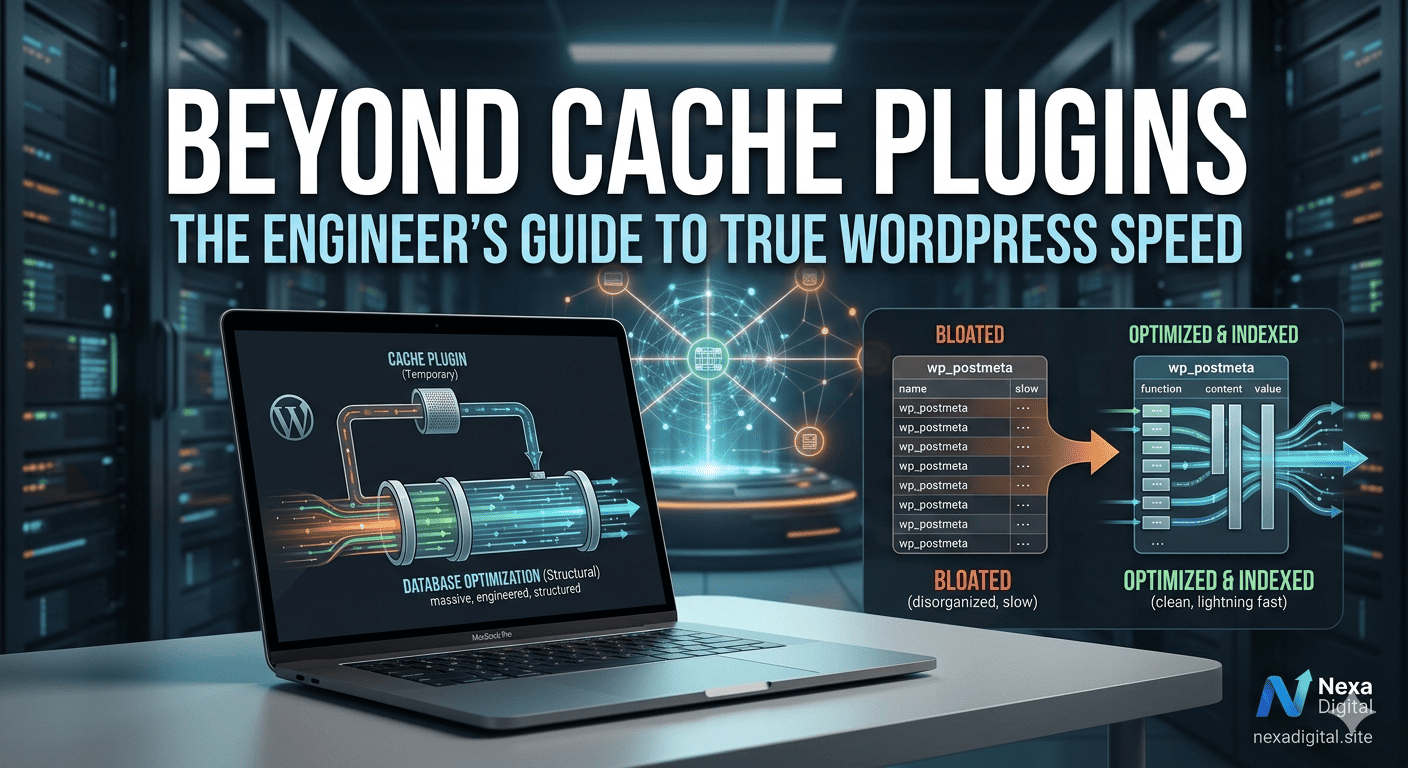
As you add plugins, content, and users to your site, your MySQL database grows. This isn’t just “more data.” It is “junk data” that slows every single dynamic query down.
1. Orphaned Post Meta (wp_postmeta)
Every custom post type (like a property listing) stores critical details (price, location, map URL) in the wp_postmeta table. When you delete a listing (perhaps a property is sold in Madurai), WordPress often leaves those associated meta rows behind. These “orphans” clutter the table. When the next visitor searches for properties, the database has to scan millions of irrelevant, orphaned rows just to find the active ones.
2. Expired Transients
Plugins use transients to store temporary data. A social media widget might use a transient to store your latest Tweet for one hour. If plugins are poorly coded, they may forget to delete expired transients. Your database keeps storing them, growing larger and slower by the hour.
3. Database Overhead (Fragmentation)
Like a physical hard drive, MySQL databases become fragmented over time as data is inserted, updated, and deleted. This fragmentation increases the physical distance the server must “travel” to read data, adding valuable milliseconds to every request.
The Real Key: Database Indexing for Dynamic Power
Cleaning the database is a good start. But for complex sites, true engineering performance comes from indexing.
Think of your database without indexing like a massive library where 100,000 books are dumped in random piles. If a visitor asks for “Real Estate Opportunities in Porur,” the librarian (your MySQL server) has to read every single book title (sequential scan) to find all matching books. This is incredibly slow and resource-intensive.
Database Indexing is like creating a detailed card catalog for that library. We instruct MySQL to pre-sort and catalog specific columns that are frequently used for filtering—such as “Property Location” or “Auction Date.”
Now, when a user searches for Porur, the server consults the index, finds the exact location of every matching entry in milliseconds, and ignores the rest of the database.
At Nexa Digital, this isn’t theory. We engineered this specific solution for the ChennaiBankAuction platform. By implementing custom indexing on key columns for over 11,000 unique listings, we achieved a near-instant responsiveness that general developers, relying only on caching plugins, simply cannot match.
The Nexa Digital Approach to WordPress Performance Engineering
Your business website is a financial asset. It should not be treated with generic solutions. Our engineering-focused speed optimization protocol includes:
- A Deep Audit: We don’t just run GTmetrix. We analyze your database schema and query log to identify bottleneck queries.
- Surgical DB Cleansing: We remove orphaned meta, expired transients, and legacy data without risking your live content.
- Advanced Custom Indexing: We analyze your site’s specific dynamic user interactions and implement custom indexing on critical tables (
wp_postmeta,wp_posts, etc.) to supercharge dynamic filtering. - Object Caching (e.g., Redis): We store frequently used query results in memory (RAM) so that common dynamic searches don’t even have to hit the database at all.
Summary: Stop Guessing. Start Engineering.
Cache plugins are an essential part of the speed formula, but they are not the source of true speed.
For a fast, reliable, and scalable website that holds the trust of financial or real estate clients, you must look beyond the surface. You must optimize the engine. You must optimize the database.
If your business website is vital for leads, sales, or data-driven functionality, contact Nexa Digital. We bring the discipline of engineering and banking trust to high-stakes web performance.
Contact us today to schedule a performance audit of your complex WordPress site.
call 8681073762 for free consultation